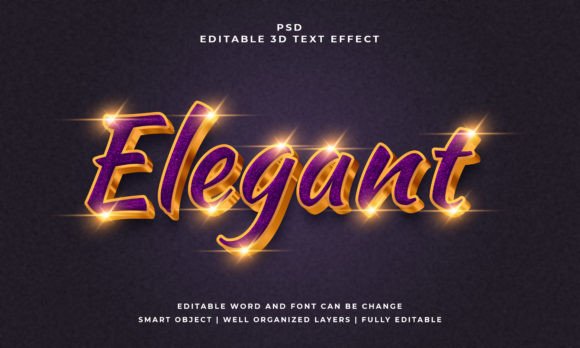
Elegant 3D Editable Text Effect for Simple, Stunning Designs
Creating a three-dimensional text effect from scratch can feel intimidating, especially if you are not a seasoned designer. Between mastering perspective, layering shadows, and balancing light sources, a single text treatment might take hours. That is where the Elegant 3D EditableText Effect comes into play. It is a ready-to-use PSD file that gives you a polished, dimensional text style without the heavy lifting. You open the file, swap in your own wording, and the effect applies automatically.
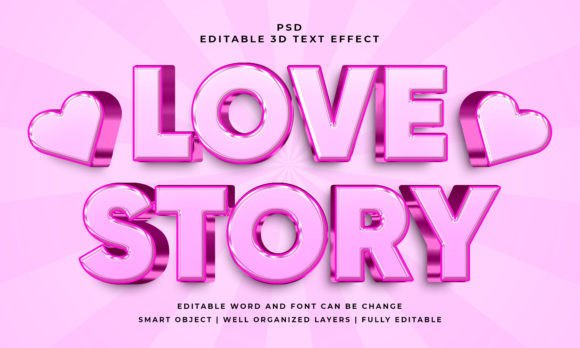
This particular asset is built around a clean, sophisticated look. The letters appear to pop off the page or screen, carrying a subtle sense of depth and refinement. It does not rely on flashy colors or extreme bevels. Instead, it uses gentle gradients and thoughtfully placed highlights to create a realistic 3D appearance. The result is a text style that feels premium, versatile, and equally at home in a business presentation or a creative portfolio.
How the 3D Editable PSD Text Effect Style Works
The file is structured around smart objects, which are the secret to its simplicity. When you open the PSD, you will see a layer clearly labeled for your text. Double-click that layer, and it opens a new window where you can type whatever you need. Once you save and close that window, the 3D effect is automatically applied to your new text.
This approach has a few practical advantages. First, you do not need to understand layer styles, blend modes, or adjustment layers to get a professional result. Second, the effect is not limited to text. You can paste a vector shape, a logo, or any other graphic into the smart object, and the 3D treatment will wrap around it. Third, the file comes with a well-organized layer structure, so if you ever want to tweak a shadow or highlight, you can do so without breaking the design.
What You Get Inside the Package
The download includes two items that cover both your working and preview needs:
- PSD file – the fully editable master file where you replace text and make adjustments
- JPEG preview – a high-quality image showing the effect as it looks out of the box
The PSD itself is set at 2000 by 1200 pixels with an RGB color profile, making it suitable for both digital use and print projects that do not require CMYK. The file size is generous enough for hero sections, social media graphics, or presentation slides, yet manageable for quick edits.
Why Someone Would Choose This Text Effect
Not every project calls for a custom-coded 3D render or hours spent building layer styles from scratch. Many situations benefit from a reliable, time-saving solution that still looks custom. The Elegant 3D EditableText Effect fills that gap neatly. Here are a few reasons someone might reach for this file:
- Speed – replacing text takes seconds, not minutes or hours
- Consistency – every piece of text keeps the same lighting, depth, and perspective
- Flexibility – works with any font installed on your system, plus vector shapes and logos
- Professional finish – the resulting text looks polished enough for client-facing work
For beginners, this eliminates the learning curve around layer effects and 3D rendering tools. For experienced designers, it frees up time to focus on layout, composition, and overall messaging rather than technical details.
Realistic Use Cases and Practical Applications
The beauty of this style is that it does not scream for attention. It adds a quiet sense of quality that fits many contexts. Below are several scenarios where the effect works particularly well.
Digital Marketing and Social Media
If you manage social media accounts for a brand or client, you know how competitive the feed can be. A simple flat text often gets lost among busy visuals. Using a 3D effect on headlines or calls to action gives them a subtle lift. For example, a promotional post that says “Summer Sale – 30% Off” can feel more prominent when the text has depth. The Elegant 3D EditableText Effect helps key messages stand out without resorting to loud animations or cluttered graphics.
Presentations and Pitch Decks
Slides that rely entirely on bullet points can feel dry. Adding a dimensional headline or section title brings energy to the deck. Entrepreneurs pitching to investors, educators presenting course material, or freelancers showcasing a portfolio can all benefit from a touch of visual polish. A single slide with a 3D title like “Our Growth Strategy” immediately signals that attention has been paid to detail.
Brand Identity and Logo Mockups
While a final logo usually needs to work in flat form, showing it in a 3D treatment during the presentation phase helps clients visualize how the mark might look on signage, merchandise, or digital ads. The same applies to entrepreneurs experimenting with a personal brand. Because the file accepts vector shapes, you can drop in a logo mark and see it rendered with depth. It is a fast way to create compelling mockups without learning 3D software.
Blog Graphics and YouTube Thumbnails
Content creators who post regularly need visuals that grab attention quickly. Thumbnails with flat text often blend in, while a 3D treatment can increase click-through rates. Bloggers covering topics like design, business, or lifestyle can use the effect for post titles or quote cards. Even a simple phrase such as “5 Tips for Better Productivity” gains authority when the text looks dimensional and well-crafted.
Educational Materials and Workshop Handouts
Teachers, trainers, and workshop facilitators often prepare handouts or slides that need to be both informative and engaging. Using a consistent 3D text style for headings creates a cohesive look across materials. It signals care and professionalism without requiring advanced design skills. A course module titled “Module 3: Color Theory” feels more inviting when the heading has a gentle 3D effect.
Important Things to Consider Before You Start
While the Elegant 3D EditableText Effect is straightforward, a few considerations will help you get the best result and avoid common frustrations.
Font Selection Matters
Because the PSD is set up with a specific font, replacing it with a different typeface can alter how the effect looks. Thick, bold fonts generally hold the 3D treatment better than thin or script fonts. If you choose a very light weight, the highlights and shadows may lose definition. It is wise to test a few fonts and see which ones keep the dimensional feel intact. The file works with 100 editable text and font options, meaning you have broad freedom, but the final clarity depends on your choice.
Smart Object Basics
If you are new to Photoshop, the smart object workflow might feel unfamiliar at first. The key is to remember that you edit inside a separate window. Once you close that window, the changes apply to the main file. It is a non-destructive process, so you can always go back and edit again. Do not try to type directly on the main canvas layer, or you will overwrite the smart object structure.
Color and Background Considerations
The default effect uses a color palette that fits many contexts, but you can adjust it. The layer groups are labeled clearly, so changing the color of the main text or the shadow is simple. Keep in mind that the 3D effect shows best against a background that contrasts with the text. A dark background can make lighter text pop, while a pastel background works well with bolder tones. Test a few background colors to see which combination enhances the depth.
Resolution and Output Size
At 2000 by 1200 pixels, the file is large enough for most digital uses, including website headers, social media cover images, and presentation slides. If you need to scale it down for a smaller graphic, that is fine. Scaling up may reduce sharpness, so it is better to create your final composition at or near the original size.
What Makes This Style Different from Other 3D Text Options
There are many ways to create 3D text. You can use dedicated 3D software, online generators, or build layer styles manually. Each approach has trade-offs. The Hello, this is 3D Editable PSD Text Effect Style distinguishes itself in a few specific ways:
- It stays editable. Unlike a rendered image, you can return to the PSD months later and change the text without losing quality.
- It is self-contained. All the layer styles, gradients, and shadows are packed into one file. There is no need to hunt for external assets or plugins.
- It works with shapes. Because the smart object accepts any vector content, the effect extends beyond words to icons, badges, and decorative elements.
This combination of flexibility and simplicity makes it a practical tool for anyone who needs regular access to a polished 3D text style without reinventing the process each time.
Tips for Getting the Most Out of the File
Once you have the PSD open, a few small practices can elevate the final result:
- Use short to medium-length text. The 3D effect is most striking on headlines, titles, or single words. Long paragraphs tend to look cluttered with depth applied.
- Pair it with clean backgrounds. Busy backgrounds can compete with the dimensional text. A minimal backdrop helps the effect stand out.
- Experiment with layer order. If the file includes separate layers for the front face, extrusion, and shadow, moving them slightly can create custom depth variations.
- Save your custom version as a template. Once you set a font and color you like, save a copy. That becomes your personal starting point for future projects.
These small steps help the effect feel tailored rather than generic, which matters when you are presenting work to clients or building a consistent brand presence.
Who Will Find This Most Useful
The design community is broad, but this particular tool resonates most with certain groups. Freelancers who juggle multiple client projects need speed without sacrificing quality. Small business owners who handle their own marketing can produce professional-looking graphics without hiring a designer. Hobbyists and casual creators who enjoy making posters, invitations, or social media content will appreciate how little effort is required to get a polished result. Even experienced designers may keep a file like this in their toolkit for quick mockups or when a project has a tight deadline.
The common thread is a need for reliable, attractive 3D text that does not demand deep technical expertise. The Elegant 3D EditableText Effect delivers that by handling the complex layer work in advance and leaving you with a simple edit-and-go workflow.
Whether you are preparing a pitch, designing a thumbnail, or building a brand presentation, having a solid 3D text style ready to go can save time and elevate your work. With the included PSD file and JPEG preview, you have everything you need to start creating right away. The only limit is the text you choose to put inside.